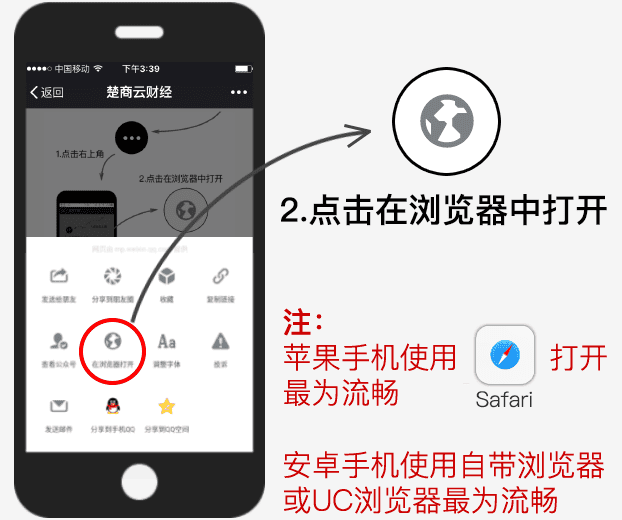
<?php
error_reporting(0);
header('Content-Type: text/html; charset=UTF-8');
header("Cache-Control: no-store, no-cache");
include 'txprotect.php';

$target = $_GET['url'] ?: '';

if (empty($target)) {
    exit('{"code":403,"error":"非法访问"}');
}

function checkmobile() {
	$useragent = strtolower($_SERVER['HTTP_USER_AGENT']);
	$ualist = array('android', 'midp', 'nokia', 'mobile', 'iphone', 'ipod', 'blackberry', 'windows phone');
	foreach($ualist as $v) {
		if(strpos($useragent, $v) !== false) {
			return true;
		}
	}
	if(strpos($_SERVER['HTTP_ACCEPT'], "VND.WAP") !== false || strpos($_SERVER['HTTP_VIA'],"wap") !== false){
		return true;
	}
	return false;
}
if(strpos($_SERVER['HTTP_USER_AGENT'], 'QQ/')!==false){
	echo '<!DOCTYPE html>
	<html xmlns="http://www.w3.org/1999/xhtml" style="font-size: 100px;">
	<head id="Head1">
	<title>请使用浏览器打开</title>
	<script src="https://open.mobile.qq.com/sdk/qqapi.js?_bid=152"></script>
	<script type="text/javascript"> mqq.ui.openUrl({ target: 2,url: "'.$target.'"}); </script>
	<meta http-equiv="Content-Type" content="text/html; charset=utf-8" />
    <!--禁止全屏缩放-->
    <meta name="viewport" content="width=device-width,minimum-scale=1.0,maximum-scale=1.0,user-scalable=no" />
    <!--不显示成手机号-->
    <meta name="format-detection" content="telephone=no" />
    <!--删除默认的苹果工具栏和菜单栏-->
    <meta name="apple-mobile-web-app-capable" content="yes" />
    <!--解决UC手机字体变大的问题-->
    <meta name="wap-font-scale" content="no" />
    <!--控制状态栏显示样式-->
    <meta name="apple-mobile-web-app-status-bar-style" content="black" />
	<link href="css/index.css" rel="stylesheet" type="text/css" />
    <script type="text/javascript" src="//cdn.bootcss.com/jquery/1.12.4/jquery.min.js"></script>
    <script type="text/javascript">
	$(function ($) {
    setRootFontSize();
	});
	window.onresize = function () {
    setRootFontSize();
	}
	function setRootFontSize() {
    $("html").css("font-size", document.body.clientWidth / 15 + "px");
	}
    </script>
	</head>
	<body style="background-color: #f5f5f5;">
    <div id="Pan_WX">
        <!--微信访问-->
        <div class="fc_jt">
            <img src="img/jt.png"></div>
               <div class="fc_wz">
                点击屏幕右上角[...]<br />
                用 浏览器 打开 
            </div>  
          <div class="fc_tp">
            <img src="img/wx_az.png"></div>
		</div>
	</body>
</html>';
exit;
}elseif(strpos($_SERVER['HTTP_USER_AGENT'], 'MicroMessenger')!==false){
?>
<!DOCTYPE html>
<html xmlns="http://www.w3.org/1999/xhtml" style="font-size: 100px;">
<head id="Head1"><meta http-equiv="Content-Type" content="text/html; charset=utf-8" />
<title>站点提示</title>
    <!--禁止全屏缩放-->
    <meta name="viewport" content="width=device-width,minimum-scale=1.0,maximum-scale=1.0,user-scalable=no" />
    <!--不显示成手机号-->
    <meta name="format-detection" content="telephone=no" />
    <!--删除默认的苹果工具栏和菜单栏-->
    <meta name="apple-mobile-web-app-capable" content="yes" />
    <!--解决UC手机字体变大的问题-->
    <meta name="wap-font-scale" content="no" />
    <!--控制状态栏显示样式-->
    <meta name="apple-mobile-web-app-status-bar-style" content="black" />
	<link href="css/index.css" rel="stylesheet" type="text/css" />
    <script type="text/javascript" src="//cdn.bootcss.com/jquery/1.12.4/jquery.min.js"></script>
    <script type="text/javascript">
$(function ($) {
    setRootFontSize();
});
window.onresize = function () {
    setRootFontSize();
}
function setRootFontSize() {
    $('html').css('font-size', document.body.clientWidth / 15 + 'px');
}
    </script>
</head>
<body style="background-color: #f5f5f5;">
    <div id="Pan_WX">
        <!--微信访问-->
        <div class="fc_jt">
            <img src="img/jt.png"></div>
               <div class="fc_wz">
                点击屏幕右上角[...]<br />
                用 浏览器 打开 
            </div>  
          <div class="fc_tp">
            <img src="img/wx_az.png"></div>
		</div>
</body>
</html>
<?php
}else{
	exit('<script>window.location.href="'.$target.'";</script>');
}
?>